
I always say that small everyday problems are the best playgrounds to learn new tools.
This time, I wanted to combine two things I care about: grocery spending and automating processes.
I live in Vienna, and like many people here, I shop in different supermarkets. In my case mostly Billa, Spar, and Hofer. Prices can change a lot from one to another, especially for organic products. So I thought: why not build a small workflow that helps me find the best prices each week?
Goal
My goal is simple: Find which supermarket offers the best total price for my weekly shopping list.
But instead of comparing prices manually, I wanted to automate the process with n8n, and connect it with a public dataset that tracks supermarket prices in Austria.
At the same time, I’m using this project to learn more about APIs, data filtering, and automations.
The First Challenge
I started with the public data from Heisse Preise, which publishes prices from Austrian supermarkets. The problem is that their dataset is huge. My browser almost froze when I tried to open it, and n8n Cloud ran out of memory when I tried to fetch it directly.
So I looked for other options:
First I tried to use Cloudflare Workers, but again, the problem was size. The file from Heisse Preise is huge, and every time I tried to fetch and filter it, Cloudflare said I was exceeding memory or CPU limits. I even tried splitting it into smaller Workers (e.g. one per supermarket) but it still wasn’t enough.
That’s when I realized this dataset is not meant to be processed live. It needs to be downloaded once, filtered locally, and then reused as a smaller version.
After the Cloudflare experiment failed because of the size of the file, I decided to handle the data locally instead. The dataset from Heisse Preise is too big for a browser or any cloud automation tool, so the best solution was to download it once, process it on my computer, and work with a lighter version of it.
Since the data and the tools are public, I used Git to manage everything. This is how I did it on Windows:
- I cloned the open-source project where the data comes from:
https://github.com/badlogic/heissepreise.git - Inside the cloned project, I took the main Heisse Preise dataset, a huge JSON file with all product prices, and moved it to a local folder to work with it.
- Then I ran a small Node.js script that filters the data, keeping only organic products (which I usually buy) from Billa, Spar, and Hofer, and excluding products I don’t consume.
The result is a much smaller file: my personal organic shopping dataset.
Moving to Automation
After I managed to filter the data locally, I wanted to make the process repeatable and automatic. Each week prices change, and I didn’t want to manually download and filter the file every time.
To solve that, I moved the whole process to GitHub Actions. Now, every week, GitHub automatically:
- Downloads the latest dataset from Heisse Preise
- Filters only organic products from Billa, Spar, and Hofer
- Removes products I’m not interested in (e.g. alcohol)
- Creates a smaller and cleaner file called
organic-vienna.json - Publishes it publicly, so I can use it from anywhere, including n8n
This file updates automatically and gives me a single source of truth for all organic prices in Vienna.
Building the n8n Workflow
Once the data was ready, I built an n8n workflow that connects this dataset with my weekly shopping list.
It matches each product from my list with its price in different supermarkets and gives me a small summary showing where each product is cheaper.
It also calculates the total price for each supermarket, helping me decide if it’s worth visiting more than one.
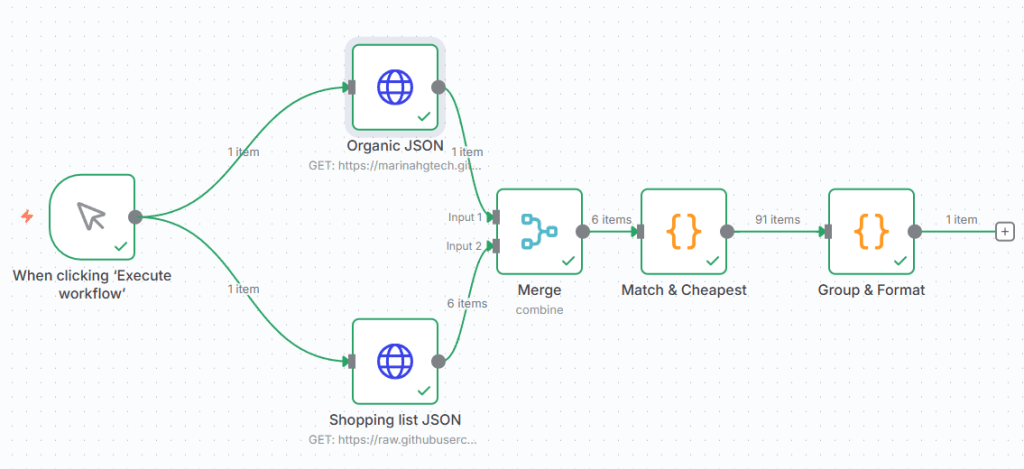
This are the nodes I used:
- When clicking “Execute Workflow”
This is the trigger node. It simply runs the automation manually whenever I click Execute Workflow. Later, I may replace this with a scheduled trigger (e.g. every Friday).
2. HTTP Request: Organic Prices JSON
This node loads the filtered file (organic-vienna.json) from my GitHub repository.
It uses the URL of the raw JSON file (for example: https://raw.githubusercontent.com/marinahgtech/organic-vienna/main/public/organic-vienna.json) and returns all the product data for Billa, Spar, and Hofer. The response format is set to JSON.
3. HTTP Request: Shopping List JSON
The second HTTP Request node pulls my personal shopping list (also stored as a small JSON file in the same GitHub project). It contains items I usually buy, in German (e.g. Tomaten, Milch, Äpfel, etc.).
4. Merge Node
This node combines the data from both previous nodes (the supermarket prices and my shopping list) so they can be compared together. The mode is set to Combine (All Possible Combinations), which pairs each product in my list with all available matches in the price dataset.
5. Code Node (JavaScript)
This node runs a short JavaScript snippet that compares product names and calculates where each product is cheapest. It groups the results by supermarket and returns a structured output like this:
[
  { "store": "Billa", "product": "Joghurt", "price": 1.29 },
  { "store": "Spar", "product": "Äpfel", "price": 2.59 },
  { "store": "Hofer", "product": "Milch", "price": 1.19 }
]
This way, I can instantly see which supermarket offers each product at the lowest price.
6. Summarize Node (AI)
Finally, I added a Summarize node that takes the structured JSON and turns it into a human-readable text summary.
It outputs something like:
🛒 Shopping plan for this week:
Buy milk and apples at Hofer, yogurt and salmon at Billa, and coffee at Spar.
The output can be displayed inside n8n or sent by email, Telegram, or any other integration I decide to add later.
What’s Next
I really enjoyed building it and managed to create something useful in just a few hours.
The workflow is still a work in progress, and I’d like to keep improving it adding Rabatt Pickerl discounts (25% off stickies), sending the results to my phone, or even automating online shopping.
If you’d like to see the full setup and workflow details, you can check it out on my GitHub project here:
github.com/marinahgtech/organic-vienna




 Marina Hernández
Leave a comment