
As a product manager, I often receive new ideas and requests from different stakeholders, from internal teams to business partners.
While many of them are valuable, I noticed a recurring challenge: some requests lacked key information, which made it hard to understand the real problem or estimate the effort.
Instead of chasing clarifications every time, I built a small automated workflow that checks whether a request includes all the information I need to properly assess it.
Why I Tried This
- Many requests arrived incomplete or missing context.
- Important details such as acceptance criteria or feasibility information were often left out.
- It sometimes took several messages or meetings to get the full picture.
- Review sessions were harder to run because of unclear or inconsistent inputs.
- I needed a way to make the request intake process easier, without adding more manual work.
What I Wanted to Achieve
- A fast and objective way to check if a request is ready for review.
- A consistent structure for evaluating request quality.
- Clear feedback for requesters, so they can improve submissions before review.
- Smoother alignment discussions, with complete and well-prepared information.
- A system that runs automatically and keeps the process efficient.
The Process I Followed
1) Define what “good” looks like
I listed the key criteria a solid request should include: Clarity, Detail, Examples, Acceptance, Feasibility, and Impact. Each one can be rated on a scale from 1 to 5, where 1 means poor quality and 5 means excellent quality.
- Clarity: How clearly the request explains the idea or problem. A clear request should be easy to understand without needing extra context or assumptions.
- Detail: The level of depth provided. This includes relevant information about the current situation, constraints, or how the change should work.
- Examples: Whether the request includes specific examples or scenarios that illustrate the expected behavior or use case.
- Acceptance: How well the success criteria are defined. This covers what should happen once the request is implemented, or how to know if it works as intended.
- Feasibility: How realistic and achievable the idea is from a technical or business perspective. It doesn’t have to include a solution, but it should be reasonable in scope.
- Impact: The potential value or outcome the request aims to deliver. For instance, improving efficiency, solving a customer pain point, or creating measurable benefits.
Together, these criteria provide a balanced way to check if a request is complete, actionable, and ready for discussion.
2) Create a shared input folder
I created a dedicated folder where new requests are uploaded as structured files.
Each file contains the request details: title, description, context, expected benefits, scope, and other supporting notes.
This ensures the automation always reads a consistent format and doesn’t depend on copy-paste errors.
3) Build the automation flow
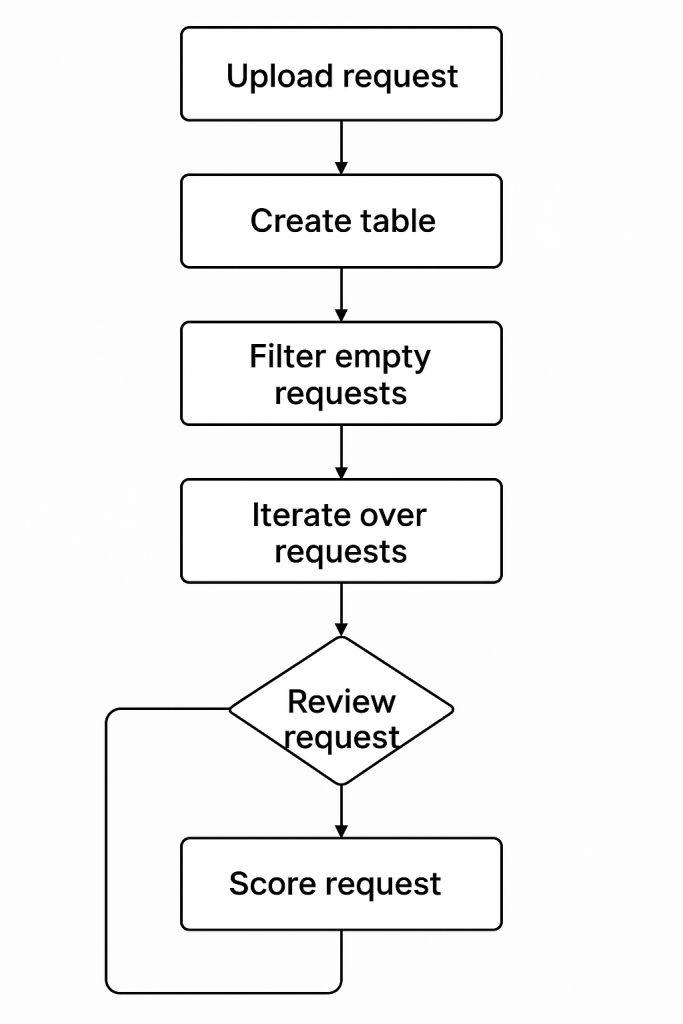
I designed an end-to-end flow with Power Automate that works in several stages:
- Trigger: The flow starts automatically whenever a new file is uploaded to the input folder.
- Read requests: It converts the uploaded file into a structured table, so the system can review each request line by line.
- Filter data: Empty or incomplete rows are ignored.
- Send to AI: Each valid request is sent to an AI model through a custom prompt that asks it to evaluate the text based on the six quality criteria.
- Parse results: The model returns a structured response (scores + comments + suggestions).
- Save results: The data is stored in a central list where I can track each request’s rating and review the AI’s feedback.
Before connecting the AI step, I made sure the tool I used met strict data protection standards. It ensures that sensitive or confidential information from requests stays within the company environment and isn’t shared externally.
4) Design the evaluation prompt
The prompt acts like a quality checklist. It asks the AI to read each request and evaluate it on the defined scale. Here’s the structure I used:
“Evaluate the quality of this request based on six criteria: Clarity, Detail, Examples, Acceptance, Feasibility, and Impact.
For each one, rate from 1 (poor) to 5 (excellent) and provide a short explanation or suggestion for improvement.”
I also added a short reference example of a well-written request. This helps the AI understand the standard of what a “good” request looks like and keep the scoring consistent.
5) Share the output
The flow stores all the evaluations in a shared list. Each entry shows the request title, its scores, and the AI’s comments. If a request gets a low average score or a weak area (e.g., clarity = 2), I can quickly reach out to the requester and ask them to refine it before discussion.
If desired, you can add an additional step to the automation flow to notify the requester about the evaluation results. After the AI generates its feedback and scores, the flow can automatically send an email (or Teams message) summarizing:
- The overall quality score of the request
- The areas that may need improvement (for example, missing details or unclear acceptance criteria)
- A short note encouraging them to update the request before the next review
This optional step helps close the feedback loop; making sure that requesters know what to improve and that future discussions start from better input.
Outcome
Now, when a new request is submitted, the workflow automatically reviews it and gives me a quality score along with improvement notes.
If something is unclear or incomplete, the requester can fix it early, before it reaches the review stage.
As a result, my evaluation sessions are more efficient , and I spend more time making decisions instead of decoding unclear inputs.
Why It’s Useful
This small automation doesn’t just save time, it also creates a shared standard of quality for everyone involved.
It helps stakeholders prepare better requests and makes discussions more efficient.
And because the workflow runs automatically, it adds structure without adding more work.




 Marina Hernández
Leave a comment